NE111: Introduction to Programming for Engineers
1 Preamble
1.1 Learning Outcomes for the Course
Here is the official course description:
Introduction to programming and numerical computing using a high-level interpreted programming language. Programming fundamentals, computer architecture, design and use of functions, strings and text input/output, relational operators, conditionals, lists, loops, designing algorithms, numerical computing, plotting, and file input/output.
Let’s translate these buzz words into plain English:
- “Introduction to programming” \(\rightarrow\) We will assume you have zero knowledge of programming
- “numerical computing” \(\rightarrow\) We will use computers as super powerful calculators
- “using a high-level interpreted programming language” \(\rightarrow\) We will use Python because it’s way easier than C/C++
- “Programming fundamentals” \(\rightarrow\) We will cover Python but the building blocks are common to all computer languages
- “computer architecture” \(\rightarrow\) We need an appreciation of this so we can get the most from the computer in terms of speed
- “design and use of functions” \(\rightarrow\) We will use functions to hide complicated logic
- “strings and text input/output” \(\rightarrow\) We sometimes need to read and write text to and from the computer
- “relational operators” \(\rightarrow\) We often need to decide if something is less than, greater than, equal to, something else
- “conditionals” \(\rightarrow\) We can tell the computer to do A if B is True, otherwise do C
- “lists” \(\rightarrow\) We can store multiple pieces of data in a sequence for later use
- “loops” \(\rightarrow\) We can scan through our lists of data to do calculations
- “designing algorithms” \(\rightarrow\) We will develop logical steps to obtain a numerical answer
- “numerical computing” \(\rightarrow\) We will use some special tools to make this happen
- “plotting” \(\rightarrow\) We will plot our results for easy visualization
- “file input/output” \(\rightarrow\) We will save our results to a file for later use
Given the above list, we can formulate a set of learning outcomes for the overall course:
Upon completion of this course you should:
- …know the syntax and features of Python quite well
- …appreciate the role of the underlying computer hardware on the performance of a computer program
- …use functions to create “code” that is concise, organized and readable
- …control the order of execution of a program using relational operators and conditional statements
- …store and retrieve data from Python’s various data containers such as lists
- …use for-loops to scan data stored in various containers and perform calculations as needed
- …develop multistep numerical calculations to compute results, such as scientific calculations
- …use state-of-the-art libraries to extend Python’s capabilities to scientific calculations
- …visualize data using a variety of graph styles
- …read and write data from memory
1.2 Outline
The official course outline is posted online via the Outline tool.
The course is broken up into 2 sections: “Before Midterm” (BMT) and “After Midterm” (AMT).
| Week | Description |
|---|---|
| Week 1a | Introduction to NE111: Discussion of course outline; overview of deliverables; installation of tools. (During the make-up lecture slot) |
| Week 1 | Introduction to Python: Installing Python; learning syntax; mathematical expressions; variable assignment; using, importing, and writing functions. |
| Week 2 | Data Types and Collections: Understand data types; working with collections; iterating through collections. |
| Week 3 | Logic and Flow Control: Introduction to Boolean logic; use of relational operators; applying logic to collections; controlling execution. |
| Week 4a | Introduction to Agentic Coding: Introduction to agentic coding; discussion of current practices; comparison of tools; overview of related tools like version control and testing. (During the make-up lecture slot) |
| Week 4 | Working with Text: Deep dive into strings; converting and formatting strings; performing operations on strings. |
| Week 5 | Reading Week |
| Week 6 | Files and IO: Introduction to the file system; reading and writing files; installing external libraries; introduction to version control. |
| Week 7 | Midterm Week |
| Week 8 | Writing Pythonic Code Crafting advanced functions; documenting functions; dealing with error conditions; using collections fully; mastering comprehensions; mastering for-loops. |
| Week 9a | Creating Data Dashboards: Using Streamlit to create graphical user interfaces. (During the make-up lecture slot) |
| Week 9 | Numerical Computing with Numpy Part 1: Overview of computer architecture; compiled vs interpreted languages; introduction to the Numpy library; overview of related libraries. |
| Week 10 | Numerical Computing with Numpy Part 2: Multidimensional arrays; fancy indexing; applications in linear algebra. |
| Week 11 | Data Management and Visualization: Reading and writing numerical data; introduction to Pandas; plotting with matplotlib and other available libraries; working with images. |
| Week 12 | Designing Algorithms: Novel data structures, recursion, computational complexity. |
| Week 13 | Introduction to Object Oriented Programming: An introduction to OOP principles; classes; inheritance; data encapsulation. |
1.3 Learning Approach
1.3.1 Learn by Doing, then Redoing
“To begin, begin”
- William Wordsworth
This course is designed to deliver the material “iteratively”. This means that we will cover the topics several times:
- The first time we see a concept, we will skip over many of the details. Instead we will focus on the rough outlines with just enough detail to do something useful.
- On subsequent passes over a concept we will fill in the gaps by focusing on more features and gaining an understanding for what is actually happening and why.
- This also means that the first way I show you how to do a task might not be the best way.
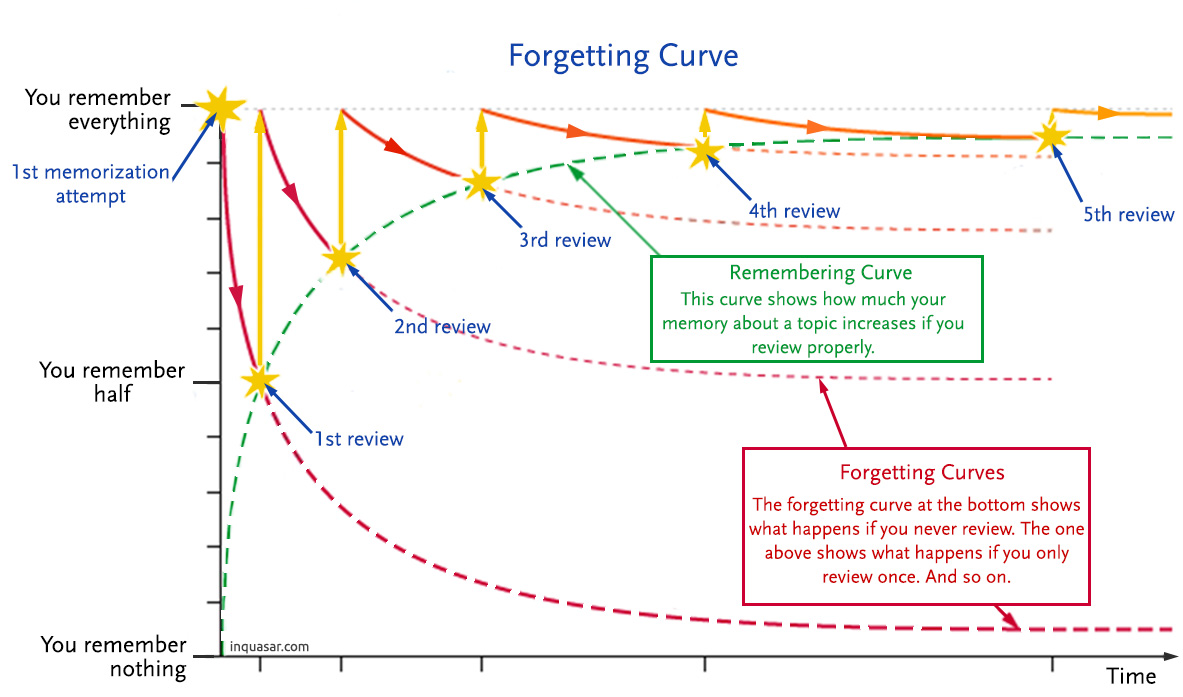
1.3.2 The Forgetting Curve
The Forgetting Curve shown in Figure 1.2 is one of my favorite mental models of learning. The point is that we don’t learn something by looking at it once. We need to revisit the material periodically before it become a permanent part of our personal knowledge base.
In the context of this course, this means two things:
- You should not expect yourself to remember every single detail of Python after the first introduction. So don’t be mad at yourself for forgetting bits and pieces. It’s normal to look-up how certain things work and it’s why good documentation is hugely important.
- The notes have been written like a manual that can be read later (i.e. 1st review, 2nd review, etc). You should come back to these notes on your own time and re-read them. The downside of this approach is that lectures will include us reading over the notes together which may seem a bit tedious.
1.3.3 The Learning Curve
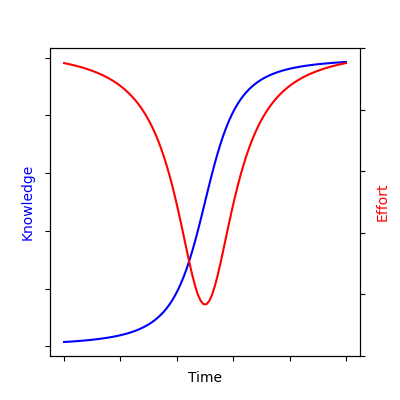
The learning curve has three stages:
- Stage 1 is when we begin to learn a subject. We spend quite a bit of time (and input a lot of effort) with little progress. This is because we have to lay the foundation, learn the basics, make connections, etc. This stage can feel frustrating and demoralizing.
- During stage 2 we make rapid progress because things begin to make sense, and learning material become easier and things feel effortless. This stage is very fun and invigorating.
- In stage 3 we enter the mastery stage of the subject and progress slows down again because the concepts are complicated and subtle. This stage is very rewarding because we know we are learning the very deepest of knowledge.
In terms of Python and programming in general:
- Stage 1 involves learning the basic syntax and rules. Examples include indexing through collections with for-loops, slicing lists, etc.
- Stage 2 involves applying the code to relevant problems. Examples include writing a program which uses various modules to accomplish something useful.
- Stage 3 involves playing with the internals of Python. Examples include subclassing a
dictor writing your own module.
The challenge when learning a new subject is getting past the first stage, when things seem unreasonably difficult and confusing. If you’re in this stage, please consider this: Confusion is the sweat of learning.
Sweating during a workout is a sign that it’s working
By analogy:
Feeling confused when studying is a sign that it’s working
1.3.4 On the use of AI
AI has had more impact on the profession of software development (i.e. coding) than other, by far. The code that AI can produce based on vague human instructions is truly astonishing.
There is reason to be concerned about the “future of work”, but for now all I’m seeing is a massive boost in my own productivity:
- AI is my highly skilled helper, more than my cheap replacement.
- However, I think I only experience this “boost” because I already know what I’m doing. I just ask AI to do it instead of me, freeing me up to do other things.
What this means for you:
- You need to know how to code well to get the most from AI’s help, so this course is not obsolete or redundant.
- In terms of this course, you should ask AI for explanations when you get stuck but not direct help.
- You can also ask it for extra practice problems, re-wording confusing descriptions, interpreting long error messages and log file, etc.
- You must know how to actually code yourself to pass this course so it would be very dangerous to have AI write your assignments for you.
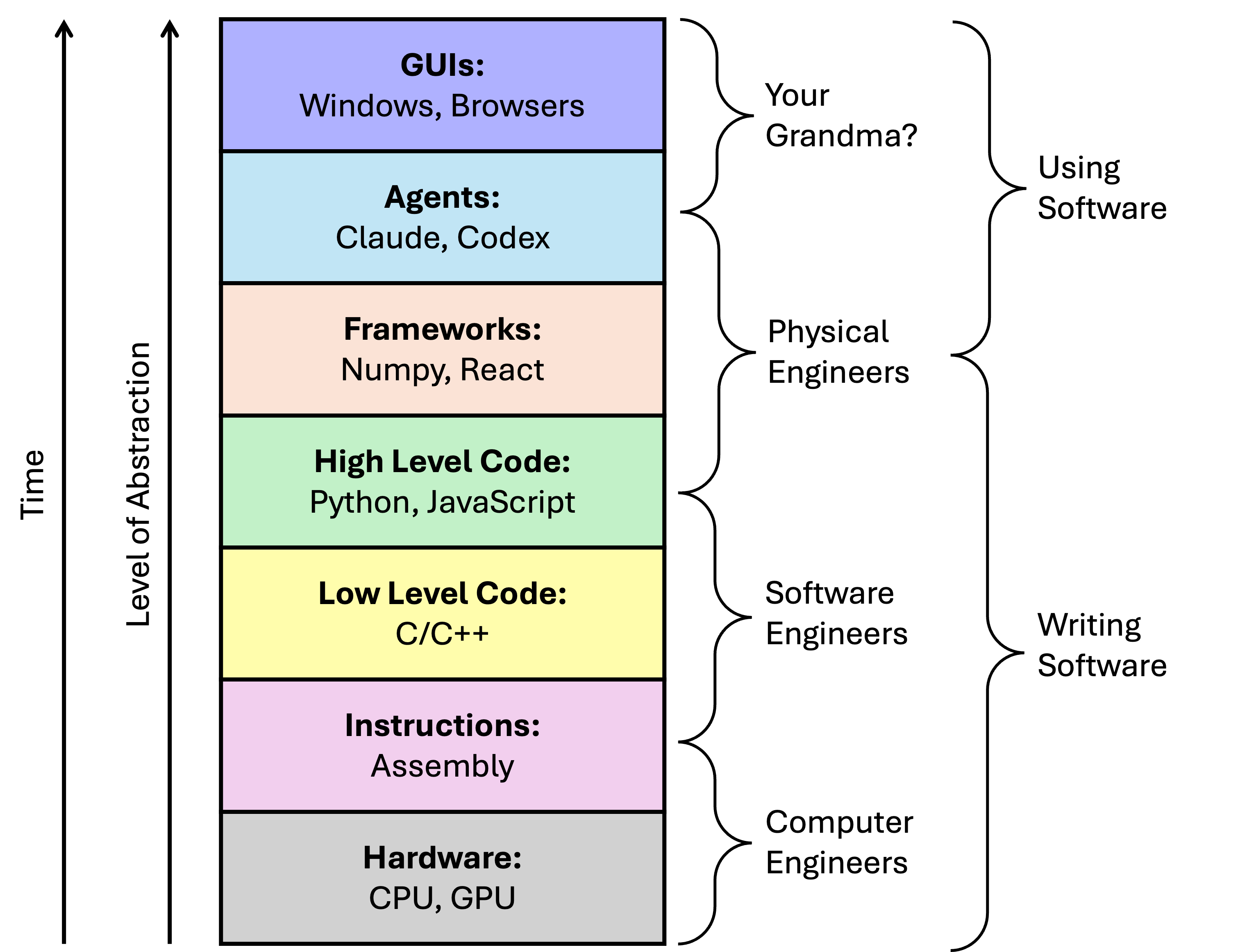
Another perspective is to think about computer programming as a “stack”, and you ask yourself where in this stack you want/need to operate.